Nexus 9 Tablet Price Down Now available at $240

Nexus 9 tablet gets price cut again, now cost $240 for the Wi-Fi only Variant. HTC Nexus 9 Tablet  is gaining strength in the raining tablet PC market. But it seems that HTC has decided to fix its price for those who can't but this Tab because of the budget. HTC introduced another price reduction of Nexus 9 tablet. The price of tablet was more than $400, if you do not know HTC Nexus 9 has already received some price cut in the last month.
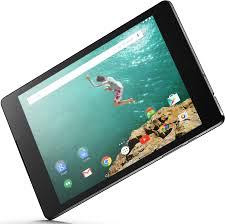
Buy Google Nexus 9 black or white, Tablet Price Down Now available at $240

You can buy Nexus 9 tablet with the new price from the Hot Deals of  company online stores. Quantities are limited and there is no expiration date as well. So if you want to buy Google Nexus 9 black or white, you simply have to pay only $239.40 for the Wi-Fi only 16 GB variant.

This Google nexus tablet was sold earlier at $399 on fixed-line retailers like Amazon. In case you want the model with 32 GB of memory then you have to pay bit more that is $287.40. For LTE-compatible Nexus 9, 32GB version, which is only available in black color at indigo, you have to pay $359.40.

The HTC Nexus 9 tablet is all set to receive the updated Android Marshmallow soon. As for  the features is concern, it has a 2K screen, Tegra SoC K1, 2 GB RAM, stereo speakers front facing, rear 8-megapixel camera with LED flash and a very large 6700 mAh battery.

Google Nexus 6 price drop now on Flipkart at RS 29,999


Google Nexus 6 price drop. Google Nexus 6 now available online in only 29,999 rupees. Google Nexus flagship of Motorola, the Nexus 6, has gone through several price drops in recent months. It has been another drop in the price tag of Rs 36,999, as reported by BGR.

Flipkart has 64GB models priced at Rs 34,999 and 32GB for Rs 39,999 respectively. Now they have further reduced the price with an exchange offer. Now you can get an additional discount to lower the price to a new low of just Rs 29,999 for the 32GB version and Rs 34,999 for the 64GB version of Google Nexus smart phone.

Nexus 6 now only 29,999 rupees also with phone exchange offer. Buy Nexus phone now

The exchange rate varies by phones model you have and Flipkart currently only allows some selected phone models for the exchange offer of Nexus phones. You can also enter the PIN number to see if it will be available to your location.

The Nexus 6 was launched in India around 44,000 rupees. The 64GB version is priced at Rs 49,000. The Nexus smartphone has a 5.96-inch AMOLED screen with a screen resolution of 2560Ã-1440 pixels. Powered by a quad core 2.7GHz Snapdragon 805 chipset and 3 GB of RAM, the phone never slows down and has a high performance and never lags.

 A main camera of 13 megapixel and 2-megapixel front camera are a delight for lovers of photography. 3,220mAh powerful battery keeps the phone battery power for a good day. Lollipop comes with Android OS out of the box. Turbo Charger of Motorola is also included in the sales package which can charge your smart phone in 15 minutes and you can get your phone charged up to 6 hours of use.

Android M how to install App Drawer on android Lollipop smartphone


Android M: How to install the App Drawer on your Android Smartphone Running on android Lollipop step by step guide. After the great success of Android Lollipop, Google has recently launched the next edition of the adored Android operating system. Announced at the Google I/O 2015, the latest version is available only in preview version and can be downloaded on Google Nexus series like Google Nexus 5 Nexus 6, and Nexus 9 and nexus player.

Android M how to install App Drawer on android Lollipop smartphone


If you do not own any of the aforementioned devices, do not feel sad, like Android Pit write a function that can give you a taste of the much-discussed role of initiator in you Lollipop M Android smartphone. Before diving into the step by step guide, we will tell the Android launcher M offers more features at a more intuitive interface.

Step by step guide of How to Install the App Drawer on your Lollipop Running Android Smartphone 


Check your smartphone, if you have already installed Google Launcher. If not, install the Google Launcher application on your Android smartphone with android Lollipop.

Once you make sure the application Google Launcher is there on your smartphone, download the Google App .apk file from there.

Android blocks the installation of applications from external sources by default. If you have not already selected, go to Settings >> Security and check the installation from unknown sources check box.

Once the download is complete, follow the instructions on the screen to get it done.

If you do not like the application you just installed in any case, simply remove the application from your smartphone.

Please note the guidance mentioned only works on smartphones with Android operating system Lollipop.

New Google Nexus Tablet 7 Will Release Tomarrow rumor


New Nexus 7 Tablet will be announced tomorrow (rumor)

Google is holding a press conference tomorrow, 24 July, is expected to announce that the new Nexus 7 Tablet and Android 4.3 Jelly Bean.

Tablet pc review of new Google nexus tablet 7 and tablets relese date

We have heard many rumors about the new Nexus 7 tablet in the past week, rumored to feature 7-inch screen with a resolution of 1980 x 1200 pixels.
The second generation of Nexus 7 tablet is rumored Qualcomm Snapdragon processor also come with a 600 1.5 GHz, the device also built with 2 GB RAM and 16 GB or 32 GB of memory.

The new tablet Nexus 7 device with front and rear equipped with a 5-megapixel snapper on the back for photos and videos and A1.2 megapixel on the front.

The updated Google Nexus 7 tablet is the first device to launch with Android 4.3 Jelly Bean, and rumors 30 July go to sale.

We should have more details on the new Nexus 7 tablet when it is officially tomorrow, when we have more information, including confirmation of the specifications of the device, we will let you know.

CyanogenMod 10.1 VS vanilla android who Is better, cyanogen nexus 5

CyanogenMod 10.1 is much Better than the vanilla Android?

Vanilla Android and cyanogenmod galaxy is infact very good. This is one of the things that most Android customers have no idea, because they have not tried a Nexus. But then you do not really need a cyanogen nexus 5.

How to use cyanogenmod, cyanogenmod nexus. ndroid device that can run on the custom ROMs


You just need to have a rooted Android device that can run on the custom ROMs! CyanogenMod is one of the most popular ROM for Android and generated CyanogenMod 10.1 recently.

Now the purpose of this post is not about CyanogenMod Android brings 10.1 vanilla experience for many devices, but in the way it really is better than vanilla Android.


Quick Fix

Quick Fix was one of the best additions to Android 4.2, but Google is really screwed the implementation. This is where to use CyanogenMod to the game and makes it much easier.
First, 10.1 cm, can be added to change fast adjustments. What this means is that you can add things like GPS, auto-rotation, sound, etc. Quick Sync Settings panel. Then they are real leverage. Who in 4.2 have not really changed, the Wi-Fi switch, for example, what about the Wi-Fi settings screen, then you have to activate it.

Another really cool thing is rapid adjustment of the CM 10.1 or cyanogenmod galaxy, you can open when you pull on the right side of the status bar and you will receive the Notification Center, if you pull it down from left to right. This is much better than Google, where you pull the tray with two fingers.


Lock Screen

CM 1.10, you can customize your keyboard shortcuts sliding. For example, as an application of the telephone, and direct access may be added quickly opened. This is what it looks like - If you use a lot of lock-screen widget can be configured to open in the expanded state by default. CM 10.1 has also cooked in a clock widget. This is a different kind of clock widget - that shows weather events and schedule over time.


Performance and battery life

Jellybean 4.2 is definitely a step back in performance for Android. It was a grave scandal among Google users in particular Galaxy Nexus Forums code. Nobody knew what happened to this project all butter goodness. Battery on my cyanogen nexus 5 was very good, however.

Now I'm with CM 3-4 days, I think I can comment on both. In operation, CM is a little better, still see box drops here and there, but certainly better than 4.2. Moreover, the life of the battery is substantially the same as 4.2.


Personalization and attention to detail

Customization is certainly something that is expected of a custom ROM and CM responds to need me. You can do things like set the screen for better colors (I've pinched for improved visibility in direct sunlight) to do.

If you try to do this on a Nexus Galaxy Nexus or 4 (both buttons on the screen), you can even additional buttons in the navigation bar. Another feature of the Nexus office development - it's like the full-screen mode on your phone.

You can configure profiles, one of the features that you find the missing feature phones and smartphones.

It also fixes a lot of trouble Android Smartphone. For example, there is a small button "Delete All" on the screen app recently. You can adjust the volume for phone, music and alarms without entering the configuration. You can adjust the brightness by changing the left / right in the status bar. You can use the battery indicator in the status bar to a circle.

I always thought that this kind of thing Google needs to implement directly on Android.


How to use cyanogenmod, cyanogenmod nexus


Therefore 10.1 CyanogenMod is worth trying? Depends. If you really are worth Nexus installation on a mobile phone, you'll probably love it.
If you are a Nexus and agree with 4.2, then CM is probably not of interest to you. Well, Android brings improvements, like that advanced users might.

Another night, but I have not seen any bugs so far and is very stable. Click on the link below to see if cyanogenmod 10.1 available for your device.

If you are a beginner in the root zone, and related topics, read the XDA Developers forum forums found messages to your device and follow them. Before we go any further, remember that rooting will void your warranty and can brick your phone (even if the odds are low) with cyanogenmod galaxy.

Download the cyanogenmod installer: CyanogenMod 10.1